 EN
EN  ZH
ZH 
Preventing Back Pain: A Dentist's Ergonomic Guide

The Silent Epidemic: Why Back Pain is a Dentist’s Shadow
Back pain is more than an inconvenience for dental professionals; it’s a pervasive occupational hazard. The daily demands of clinical practice—prolonged static postures, repetitive motions, and the need for high precision—create a perfect storm for musculoskeletal strain. Many clinicians accept neck, shoulder, and back pain as an unavoidable part of the job. However, this is a dangerous misconception. Understanding and applying ergonomic principles is not a luxury; it’s a fundamental requirement for a long, healthy, and productive career.
This guide provides a practical, evidence-based framework for preventing back pain. We will move beyond generic advice and delve into the specific, actionable adjustments you can make to your operator stool, patient chair, and daily workflow. By optimizing your working environment, you can significantly reduce physical strain, enhance your focus, and protect your most valuable asset: your own well-being.
Foundations of Dental Ergonomics: From Posture to Practice
At its core, ergonomics is the science of fitting the workplace to the worker. For dentists, this means arranging your equipment and environment to support a neutral, balanced posture. The primary culprits of chronic pain are sustained, awkward positions. Research and clinical experience point to two main postural sins:
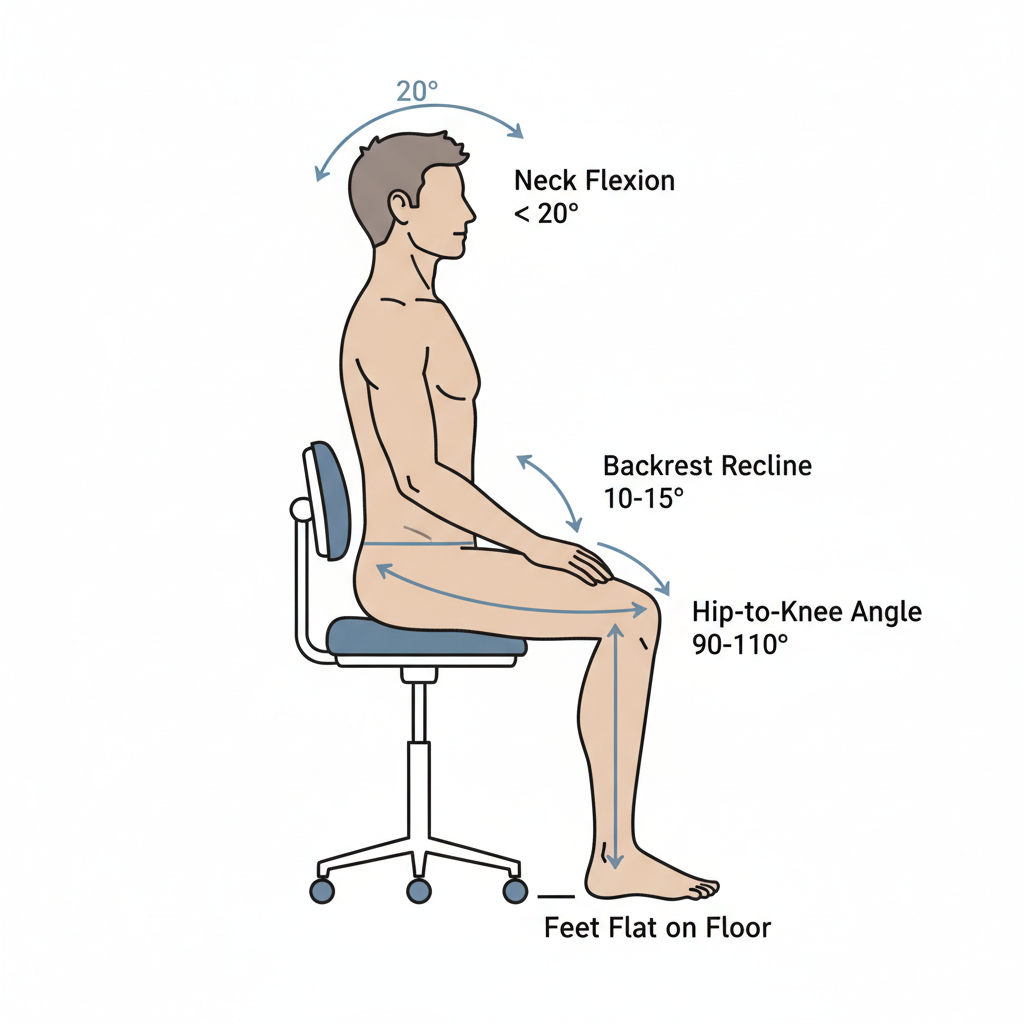
- Excessive Forward Head/Neck Flexion: Leaning your head forward more than 20 degrees dramatically increases the load on your cervical spine. This is a common result of trying to get a better line of sight.
- Sustained Trunk Rotation: Twisting your torso more than 30 degrees to reach for instruments or adjust lighting places significant stress on the lumbar spine.
The goal is to create a “home base” posture that minimizes these deviations. This involves a holistic view of your operatory, where every piece of equipment works in harmony. High-quality dental equipment is designed with these principles in mind, adhering to rigorous standards that ensure functionality and safety. For example, regulations like the EU MDR (Medical Device Regulation) mandate that manufacturers consider ergonomics in product design to ensure user safety and performance.
The Myth of “Toughing It Out”
A common but harmful belief is that physical discomfort is simply the price of being a dedicated clinician. In reality, pain is a signal that your body is under excessive strain. Ignoring it can lead to chronic conditions and even career-ending injuries. Proactively addressing ergonomics is not a sign of weakness; it is a mark of a smart, sustainable professional practice. Studies available through resources like PubMed consistently link musculoskeletal disorders in dentists to poor working postures, underscoring the need for preventive strategies.
Calibrating Your Core: The Operator Stool Setup Checklist
Your operator stool is the single most important piece of ergonomic equipment you own. An improperly adjusted stool forces you into compromising positions, negating the benefits of even the most advanced dental chair. Use the following step-by-step checklist to establish a neutral, supported seated posture.
| Step | Action | Ergonomic Goal & Key Metrics | Common Mistake to Avoid |
|---|---|---|---|
| 1 | Plant Your Feet | Start with your feet flat on the floor. If they don’t reach, use a stable footrest. This creates the foundation for your entire posture. | Dangling your feet or perching on the edge of the stool. |
| 2 | Adjust Seat Height | Set the height so your hips are slightly higher than your knees, creating a 90–110° angle. A typical range is 42–52 cm. | Setting the stool too low, which causes excessive knee flexion and forces you to lean forward. |
| 3 | Engage Lumbar Support | Adjust the backrest so it makes firm contact with your lumbar region (around the L3 vertebra). | Allowing the backrest to push your shoulders forward or having a gap between it and your lower back. |
| 4 | Set the Recline | For working postures, a slight backrest recline of 10–15° helps reduce pressure on your spinal discs without encouraging slouching. | Using the backrest to lean far back. It is for active support, not passive relaxation. |
Fine-tune these settings in small 1–2 cm increments. What feels right for a colleague may not be right for you. The goal is a posture that feels balanced and sustainable, not rigid.
Optimizing Your Workspace: The Ergonomic Triangle
Once your personal posture is set, the next step is to arrange your environment to protect that posture. This involves the patient chair, your instruments, and your workflow.
The Working Triangle: Patient, Clinician, and Instruments
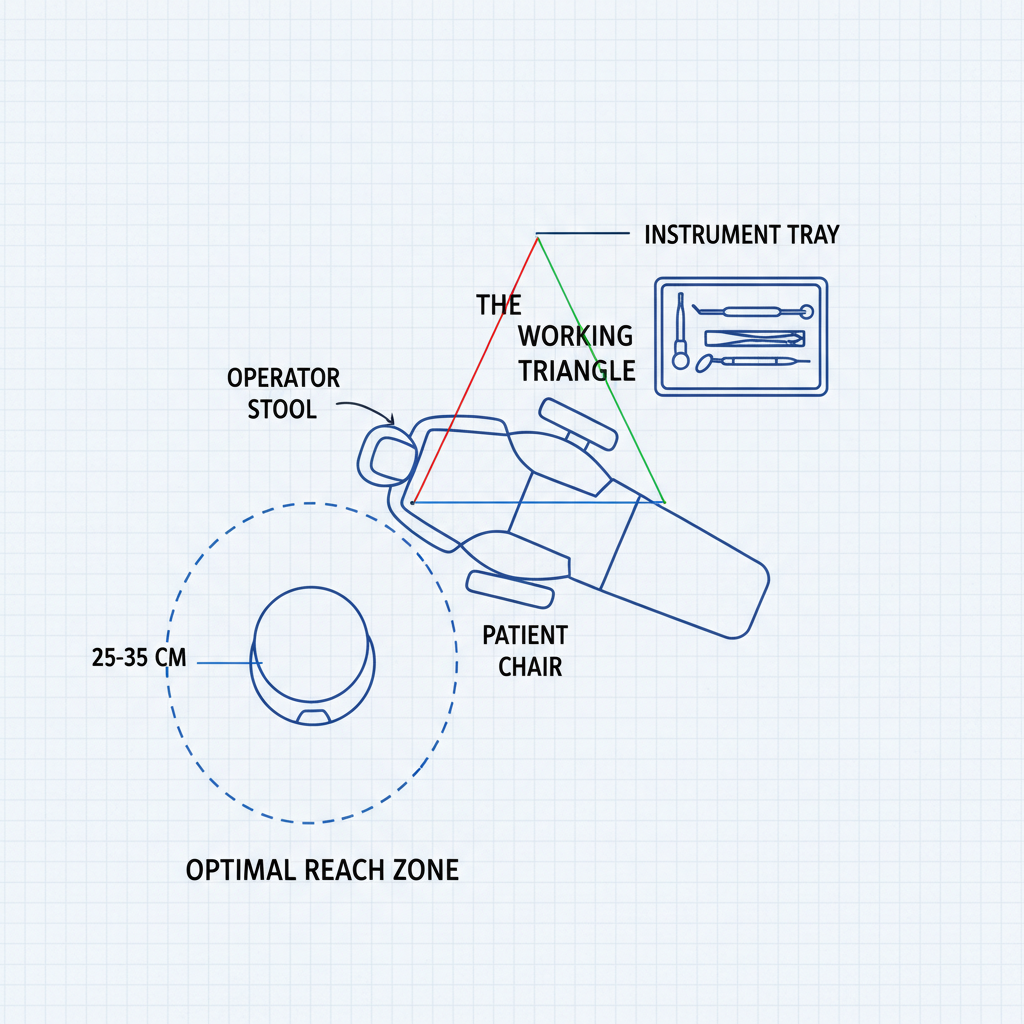
Think of your immediate workspace as an ergonomic triangle. You, the patient, and your most frequently used instruments should be positioned to minimize reaching and twisting.
- Instrument Proximity: Keep your primary handpieces and instruments within a comfortable primary reach zone of 25–35 cm. Consistently reaching beyond this range forces you to lean forward or twist your torso, breaking your neutral posture.
- Patient Positioning: Don’t be afraid to adjust the patient. Move the patient chair up/down or ask them to turn their head. It is always better to move the patient to improve your line of sight than it is to contort your own body.
- Stool Mobility: Use the rotational capabilities of your operator stool to face your work area directly. Instead of twisting your back to reach a tray, pivot your entire body with the stool.
Adherence to quality management systems, such as those outlined by the FDA in 21 CFR Part 820, ensures that dental equipment is manufactured to be reliable and adjustable, giving you the control you need to maintain this ergonomic triangle.
Context is Key: Adapting to Different Procedures
Ergonomic needs can change depending on the task at hand. A “one-size-fits-all” setup doesn’t exist.
- Pediatric Dentistry: These appointments often require greater mobility and frequent position changes. You may prioritize a stool with less restrictive arm support to allow for quick movements.
- Endodontics & Implants: These long, high-precision procedures demand static stability. Here, robust lumbar support and fixed armrests can be invaluable for maintaining a supported posture over an extended period.
The Power of Microbreaks
Even with a perfect setup, prolonged static postures are fatiguing. Your muscles need rest and movement. Incorporate 30–60 second microbreaks every 20–30 minutes. During these breaks, stand up, stretch your neck and shoulders, and look away from the patient. This simple habit helps reset your posture and reduces cumulative strain.
Wrapping Up: Key Takeaways for a Pain-Free Practice
Preventing back pain is not about finding a single magic bullet. It’s about building a system of small, consistent habits and an environment that supports your body. True ergonomic mastery comes from a conscious, daily commitment to prioritizing your physical well-being.
- Master Your Stool: Your operator stool is your throne. Calibrate its height, seat angle, and backrest to support a neutral, powerful posture.
- Respect the Reach Zone: Keep your most-used instruments within a 25–35 cm radius to eliminate leaning and twisting.
- Move the Patient, Not Your Spine: Adjust the patient chair to bring the oral cavity into your ideal line of sight. Your posture is non-negotiable.
- Embrace Microbreaks: Integrate short, frequent breaks to stand, stretch, and reset your muscles. It’s a small investment with a huge return.
Frequently Asked Questions (FAQ)
How often should I perform an ergonomic assessment of my operatory?
It’s good practice to review your setup at least once a year. However, you should re-evaluate it any time you get new equipment, change your primary procedures, or begin to feel persistent discomfort.
What is the single most important ergonomic adjustment I can make?
While ergonomics is a holistic system, the most impactful starting point is correctly adjusting your operator stool height to ensure your feet are planted and your thighs slope gently downward. This sets the foundation for everything else.
Can a new dental chair alone solve my back pain?
While a high-quality, ergonomic dental chair is a critical component, it cannot solve pain by itself. Back pain is most often caused by the clinician’s posture and work habits. The chair is a tool; how you use it in conjunction with your operator stool and instrument placement is what truly matters.
Disclaimer: This article is for informational purposes only and does not constitute professional medical advice. The information provided is intended to support, not replace, the relationship that exists between a patient/site visitor and his/her existing physician. Always seek the advice of a qualified health provider with any questions you may have regarding a medical condition. Do not disregard professional medical advice or delay in seeking it because of something you have read in this article. Individuals with pre-existing back conditions should consult a physiotherapist before adopting new ergonomic routines.
References
About the Author