 EN
EN  ZH
ZH 
Intraoral Cameras Explained: A Simple Way to Build Patient Trust

The integration of dental intraoral cameras into modern dental practices has fundamentally transformed how dentists communicate with their patients. By providing real-time visual evidence directly from inside the mouth, these advanced imaging devices bridge the communication gap, making complex dental concepts easily understandable and fostering greater trust and treatment acceptance.
What Is a Dental Intraoral Camera and Why Do You Need One?
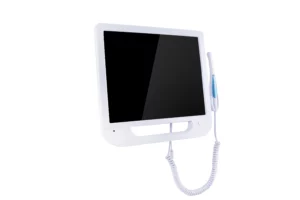
Learning how dental intraoral cameras work helps you understand why they’ve changed the way dentists talk with patients. These smart little devices combine high-tech cameras with simple, easy-to-use controls that anyone can figure out.
| Component | Details | Description |
| Physical Design | Handheld Probe | Pen-like device, ~15–20 cm long for easy oral maneuvering |
| Display Screen | High-definition LCD monitor, typically not built-in—most intraoral cameras rely on external screens rather than 15-19 inches | |
| Core Technology | Micro Camera | 1.3 MP CMOS sensor (stills), 640×480 or up to 1280×720 px video |
| LED Lighting | 6 to 8 white LEDs, not unspecified “adjustable brightness” | |
| Technical Specs | Resolution | 640×480 to 1280×720 pixels, not simply “1.3 MP” without context |
| Magnification | Typically 4× optical zoom, not “10–100× adjustable zoom” | |
| Primary Functions | Live Examination | Instant observation of oral conditions |
| Documentation | Save photos and videos with annotations | |
| Applications | Cavity Detection | Discover early decay and hidden cavities |
| Periodontal Exam | Observe gum inflammation |
This comprehensive technology package makes the intraoral camera an indispensable tool in modern dental offices, setting the stage for enhanced patient communication and improved treatment outcomes.
How Do Dental Cameras Work with Your Dental Chair?
The integration of interoral cameras and dental equipment makes things more efficient and enhances the patient experience. This interface makes every tool part of a teamwork communication system.
Easy Setup with Modern Equipment
The actual magic happens once you’ve got an intraoral camera in your dental equipment. Many modern dental chairs come equipped with built-in mounts that hold the camera in a perfect position. Hooking it up is a breeze – you simply insert it into the USB or HDMI outlet on the dental unit.
Your dental chair’s overhead monitor displays the camera feed immediately, giving patients a clear idea of what you’re examining. Foot pedal controllers often include camera functionality as well, allowing you to take photos without removing your hands from the instruments.
Making Digital Records Simple
When your intraoral camera hooks up to your dental unit’s computer, patient records get way more organized. Images save themselves to the right patient file along with date stamps and treatment notes. This smooth workflow means you won’t lose any photos or mess up records anymore.
This type of integration ensures all the visual evidence is incorporated into a comprehensive digital record, making it simpler and more astute for follow-on consultation.
Why Do Patients Trust You More When They Can See Their Teeth?
Visual evidence can actually transform doubting patients into well-informed proponents of their own oral health. You cannot really overstate how seeing things firsthand does a world of good in building a good rapport with patients.
Showing Beats Telling Every Time
It’s pretty cool to actually show patients what’s up instead of just telling them. Like, when you aim an intraoral camera at a cracked tooth or a gum infection, they instantly get why they need treatment. This visual proof takes away all the guessing and really helps build trust.
Traditional dental exams often left patients confused about their diagnosis. The dental intraoral camera changes this by making everything transparent and clear.
Being Open Makes Patients Feel Better
Patients prize transparency, and nothing is more transparent than demonstrating to them their own mouth in a close-up. This transparency engenders trust and allays anxiety that typically pervades dental visits. The before-and-after register provides patients with a chance to trace their development and stay motivated.
When patients can clearly visualize their oral care process in simple pictures, they actually enjoy preventive work and consultation recommendations more.
What Good Things Happen When You Use Cameras in Your Dental Office?
The combination of a dental unit with cameras generates heretofore unheard-of opportunities in patient engagement and real-time education. The combining technology converts the routine oral exam into interactive education.
Teaching Patients While You Work
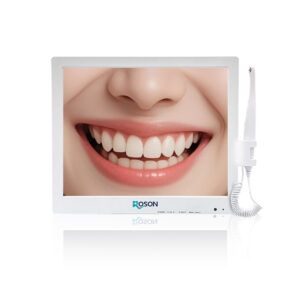
The most significant advantage of an intraoral on-unit camera is in-office, real-time patient education. As you are examining teeth, you can point on the large monitor and say what it is that you’re examining. This immediate visual education provides patients with a clearer sense of their oral conditions than ever before.
You don’t merely describe cavities; you really demonstrate them to the patients. The magnification allows people to actually see things they would otherwise completely miss, and it’s really helpful in describing them and really informative as well.
Getting Patients to Say Yes to Treatment
When patients actually understand what’s happening with their teeth, they’re much more likely to cooperate with the treatments recommended. Pictures make a big difference in wiping away uncertainty or distrust. Patients can’t contradict what’s in front of their faces, so they receive the treatment better and have healthier teeth in general.
All this chatting really helps build a smoother relationship between the patient and the dentist, leading to better oral health in the long run.
How Do You Use an Intraoral Camera the Right Way?
Technically correct and systematic methodology are keys to obtaining maximum communication potential from intraoral cameras. Adherence to procedures allows consistency in outcome and the best patient experience.
Step 1: Get Your Camera Ready
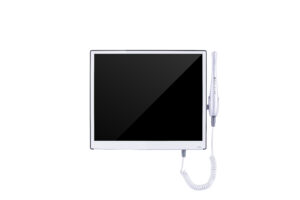
Ahead of entering any patient, position your intraoral camera. Turn on the system and allow it a 1-minute initialization time. Clean the lens on the intraoral camera with alcohol wipes – in pictures, any smudging is noticeable. Perform basic function testing, such as pictures, video, and Zoom. Prepare LED light illumination depending on what you’re about to be examining.
Step 2: Make Your Patient Comfortable
Ask patients to rinse with water to clear debris. Position the dental chair for comfort and monitor viewing. Explain the process in simple terms and put on protective sleeves while patients watch. This visible attention to cleanliness builds confidence.
Step 3: Be Gentle When Looking Around
Pan in slowly to the mouth, excluding gums and teeth. Alter angle and depth as needed by the region under study. Make gentle movements – wracking causes blur and discomfort. Work methodically through successive regions of the mouth.
Step 4: Take Great Photos
Get yourself in focus before you take a picture. When you spot something important, take a quick picture from various angles. Make notes on every picture immediately, such as the tooth number and what’s wrong with it.
Step 5: Talk with Your Patient
Simply describe what you’re seeing in laymAn’s terms. Go into specifics. Compare and contrast unhealthy areas and healthy tissue. Have a conversation – if patients are involved, there are chances they’ll be more adherent to meds.
Step 6: Save Everything and Clean Up
Save all patient imaging files properly labeled. Disinfect and clean equipment as per the methods of controlling infections. Daily backup of critical images and equipment condition checking.
Familiarity with all techniques assures that all intraoral camera consultations are effective communication media that ideally complement the dentists’ relationship with patients.
Common Questions About Dental Intraoral Cameras
Q1. Does Using an Intraoral Camera Hurt or Feel Uncomfortable?
No chance, not a hair! The lens itself is pen-thin and goes in quite gently. Many are surprised by how gentle it is. The LED light does not heat up, so no heat sensitivity. Many people actually enjoy having a look in their mouth for the first time out. And if in reality you’re a gagger, dentists can take their time and be quite gentle.
Q2. Can I Get Copies of My Intraoral Camera Pictures?
You most definitely can. Those are in your dental chart, and you are within your rights in having photocopies. The vast majority can email them as pictures or print out paper copies. Photocopies are quite useful in presenting relatives, getting a second opinion, or merely keeping tabs on changes down the line.
Q3. Do Intraoral Cameras Show More Detail Than What the Dentist Can See?
Absolutely. Most cameras offer 640×480 to 1280×720 pixel resolution, which—combined with magnification and lighting—reveals fine features like micro-cracks, early decay, and inflamed gum tissue that are often missed by the naked eye.
Intraoral Cameras and Patient Trust
Using intraoral cameras is a total game-changer for being open about dental stuff and really focusing on patients. It puts everything right there in your hand, so every visit becomes a chance to learn and build trust with your dentist. Want to see how seeing things visually can totally change your trips to the dentist? Just book an appointment at a place that uses intraoral camera tech and check out your oral health in a fresh way.
About the Author