 ZH
ZH  EN
EN 
Top Configuration Options to Compare When Buying Electric Dental Chairs

Buying an electric dental chair is not simply a matter of counting functions. A useful comparison is to check the chair’s position and safety.
Check infection control and comfort. Make sure the chair’s customization fits the practice’s procedures and workflow. For distributors, the same comparison should also cover configuration flexibility, documentation, training, and after-sales support.
How Should You Compare an Electric Dental Chair Before Buying?
The best way to compare an electric dental chair is to start with your clinical workflow. Then check if each setup meets a specific operational need.
| Configuration area | What to compare | Why it matters |
| Positioning | Chair movement, memory positions, emergency positioning | Supports repeatable treatment positioning |
| Safety | Obstacle detection, anti-pinch functions, movement locks | Reduces risks associated with unintended movement |
| Infection control | Waterline treatment and cleaning access | Supports the practice’s infection-control procedures |
| 控制装置 | Touchscreen, foot controls, shortcuts, user profiles | Can reduce unnecessary interaction during treatment |
| Patient experience | Upholstery, support, movement, comfort features | Affects the treatment environment |
Which Electric Dental Chair Configurations Matter Most?
How Should You Compare Chair Positioning and Safety Controls?
Compare how precisely and safely you can position the chair. Don’t simply inquire about the number of motors or movements included.
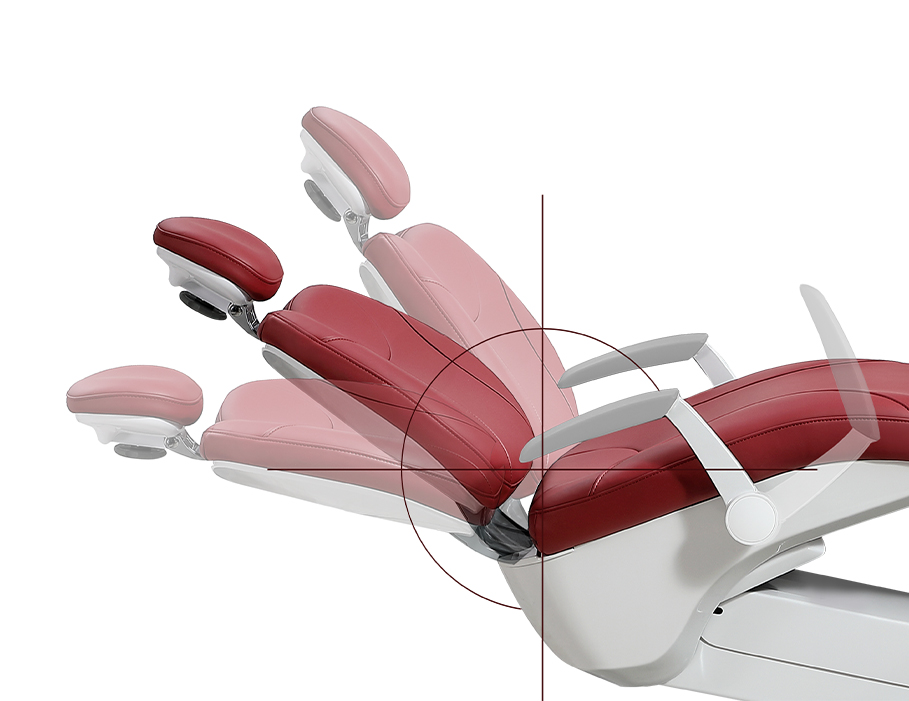
Positioning affects both access for the dental professional and the patient’s experience. The American Dental Association lists posture, movement, and positioning as key ergonomic factors in dental practice. Assess the chair and stool setup together.
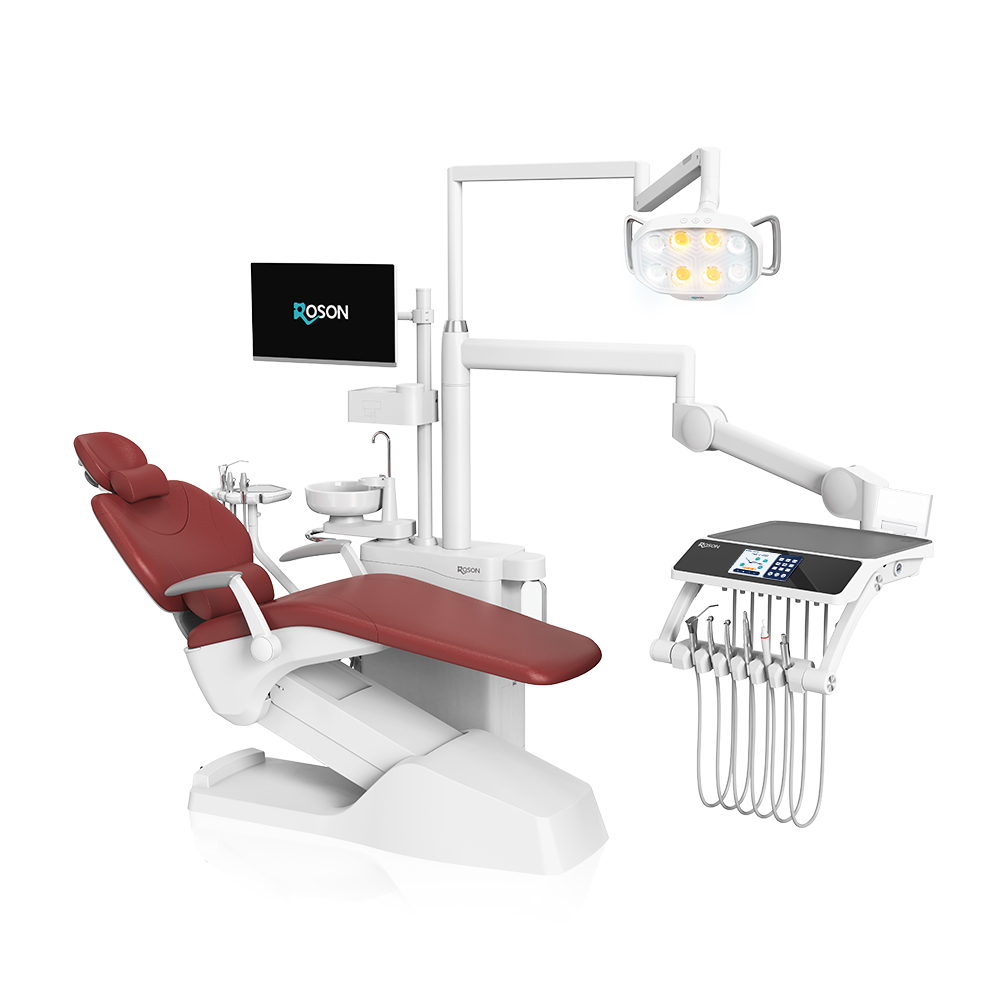
Safety controls deserve a separate check. ROSON’s S9+ includes anti-pinch protection for the legs, feet, and armrests.
It also reverses automatically when it detects an obstacle. It has a one-touch emergency position. It also has a safety lock that prevents chair movement during instrument use.
What Should You Check About Disinfection and Waterline Management?
Check the chair’s waterline disinfection function against the clinic’s infection-control procedures and the manufacturer’s maintenance instructions.
The CDC notes that dental unit waterlines can support biofilm growth. This is because of narrow tubing, low flow rates, and periods of stagnation. It recommends maintaining and monitoring dental treatment water and consulting the equipment manufacturer about appropriate waterline treatment and monitoring methods.
诺胜 says the S9+ uses its EOW-TECH electrolytic oxidation disinfection system. It reports a bacterial reduction rate of at least 99.9999%. That is a manufacturer claim. Consider it along with the clinic’s protocols, applicable rules, and the supplied instructions for use.
How Important Are Controls, Displays, and User Profiles?
Controls become more valuable when they make common chair movements and settings easy to repeat during treatment.
For example, the S9+ includes a medical-grade 7-inch touchscreen. It also has 5 × 3 configurable memory positions. It includes a four-way foot controller.
It supports shortcut combinations. It offers scheduled maintenance reminders. It has dedicated user profiles. These functions can be relevant to clinics with multiple operators or recurring treatment workflows.
When comparing models, ask which controls are standard and which are optional. That distinction matters for both distributors preparing quotations and clinics calculating the actual installed configuration.
How Does ROSON Apply These Configuration Choices?
What Does the ROSON S9+ Offer?
The S9+ Security Master combines safety functions, digital controls, disinfection features, ergonomic design, and patient-comfort features in a configurable dental unit.
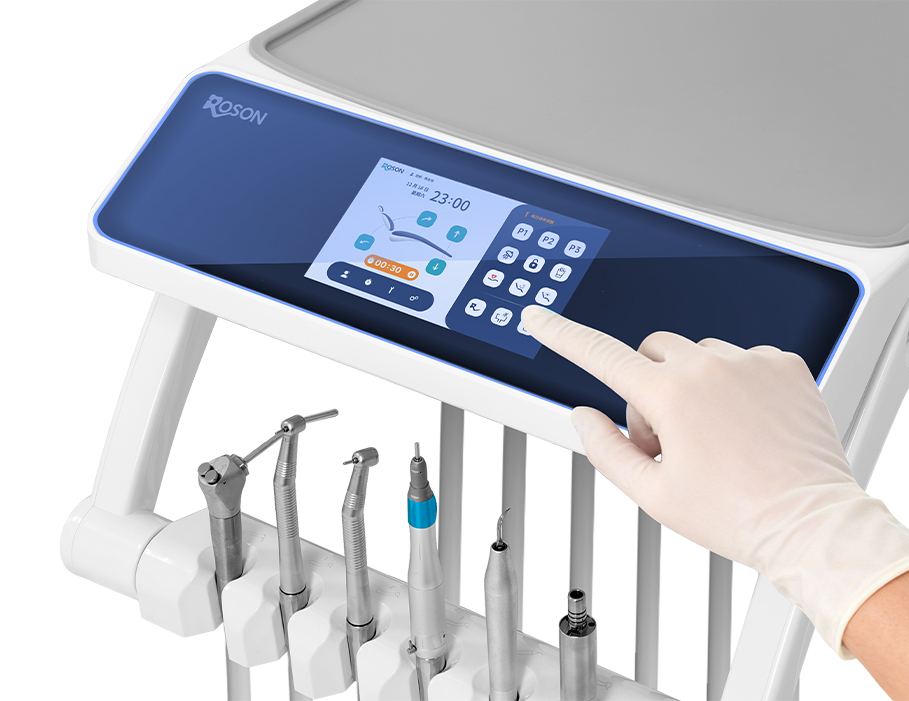
We list a zero-gravity linkage seat and medical-grade silicone armrests as part of the S9+ configuration. It also includes a 7-inch touch control screen and configurable memory positions.
The S9+ also has an EOW-TECH disinfection system and several safety functions. The product shows the built-in scaler, micro motor, curing light, and intraoral camera. Lumbar and neck support are optional items.
Our dental-chair range additionally includes the A1 PRO, A3, and N2 PRO models. However, you should check the exact specs for those models on their official product pages. Do not infer them from the S9+ configuration.
Which Customization Options Should Distributors and Clinics Compare?
Compare customization by intended use, not by the number of available choices.
For the S9+, ROSON lists over-the-patient, swing-mounted, cart-mounted, and implant options. It also offers several upholstery and color choices. Customers can customize specific configurations according to their requirements.
For distributors, this flexibility can make the product easier to position across different clinic segments. For example, a training center may focus on repeatable controls and durability. A private clinic may focus more on patient comfort, digital controls, or selected integrated accessories.
What Should Distributors Compare Besides Product Specifications?
Distributors should assess the supplier’s support after purchase, since a suitable chair can still cause problems. This can happen if installation, use, maintenance, or communication support is difficult.
We work with distributors and dental professionals in over 100 countries. We support installation, operation, maintenance, and after-sales service. We also provides operation and maintenance resources, including user manuals and self-service guidance.
For a distributor quotation, therefore, compare warranty terms, available manuals, training resources, spare-parts arrangements, customization procedures, and communication support alongside the chair’s hardware.
How Should Dental Clinics Match Configurations to Their Workflows?
Clinics should first identify the procedures, operators, and patient expectations the chair must support. Then, they should select only the configurations that meet those needs.
A general practice may need reliable positioning, easy controls, practical cleaning, and core integrated instruments. A practice performing procedures that require more specialized positioning may place greater value on a customized configuration.
A clinic with many operators may benefit from memory positions and user profiles. These features can save repeat settings. They can also recall those settings later.
This approach also helps avoid a common buying mistake. It stops you from paying for optional features too soon. First, you should understand how staff will use them every day.
What Should You Check Before Buying an Electric Dental Chair?
Which Questions Should You Ask the Manufacturer?
Ask the manufacturer to turn every important configuration claim into a clear quotation, specification sheet, warranty condition, or operating instruction.
·Which functions come standard, and which functions can you add as optional features?
·What waterline treatment and maintenance procedure do we need to follow?
· Which chair adjustments can you save as preset memory positions?
· What safety functions respond automatically to obstacles or operating conditions?
· What are the warranty periods for major components?
· Which manuals, installation resources, and after-sales support channels are available?
Why Should After-Sales Support Be Part of the Purchase Decision?
After-sales support should be part of the equipment package. Installation, maintenance, troubleshooting, and operator training affect chair performance in real clinical use.
We provide resources for installation, operation, maintenance, and after-sales support. The S9+ includes component-specific warranty periods.
These include five years for the water and air pipelines. They also include five years for the TIMOTION motor. The RoLight dental light has a three-year warranty.
Conclusion: How Can You Choose the Right Electric Dental Chair Configuration?
An appropriate electric dental chair configuration should match the clinical workflow, safety requirements, infection-control process, operator needs, patient expectations, and service plan.
Start by comparing positioning and safety. Then review waterline management, controls, ergonomics, patient comfort, integrated accessories, and customization. For distributors, add warranty, documentation, training, and supplier support to the comparison.
ROSON’s S9+ is one example of a configurable dental unit. It combines safety functions, digital controls, disinfection, and comfort features. It also offers optional accessories as part of its design.
If you are comparing setups for a clinic or distribution program, contact us. We can discuss the setup needed for your market.
关于作者